Scoreboard - Keep score
- 4.9
- Rating
- 500.00K
- Installs
- Free
- Price

 Analysis by App-foxy
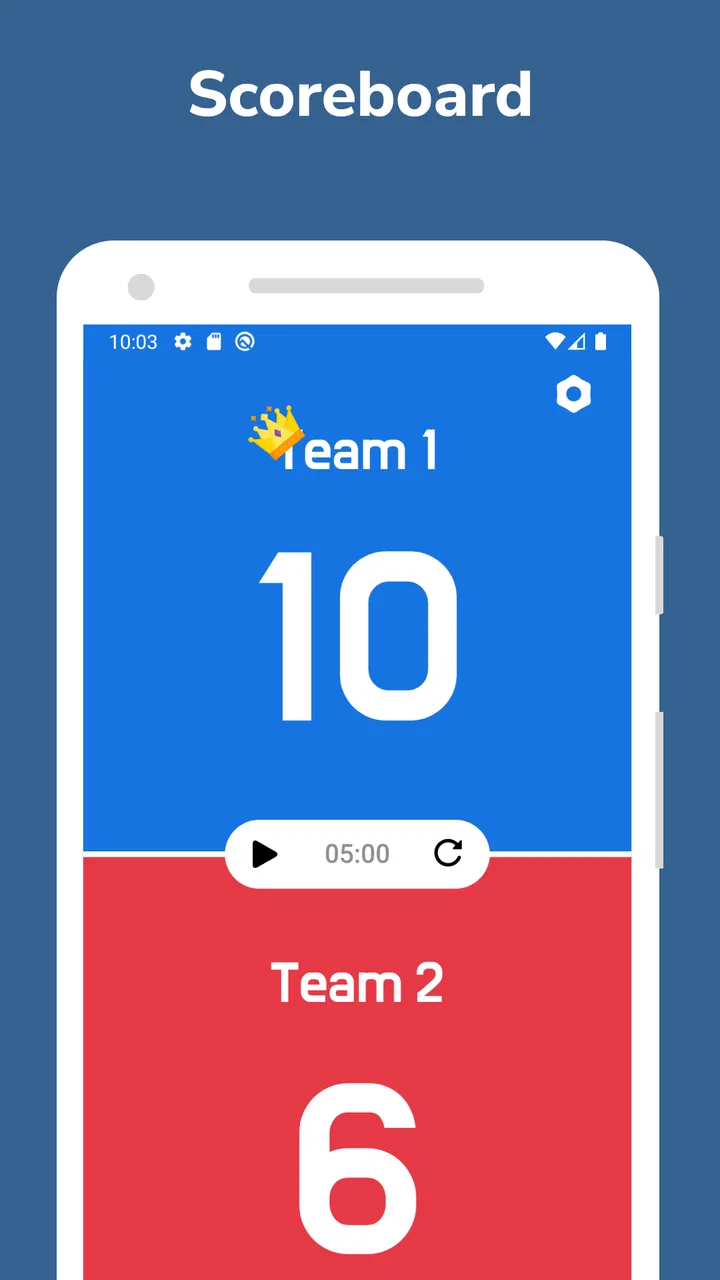
Keeping score sounds simple until the match starts moving quickly. Someone is serving, another person is watching the clock, and the phone is passed around while everyone tries to remember whether the last point belonged to the blue team or the red team. I found Scoreboard - Keep score most useful in exactly those ordinary situations: a shared phone on a table, two sides competing, and one person responsible for making the result visible.
This is a free sports app from Truyendiv, built around one focused job rather than a large collection of sports tools. Its store summary describes a user-friendly way to follow the score of two teams, and that narrow purpose is also its main strength. It does not ask me to create a league, manage a roster, or learn a complicated scoring system before I can begin. I open it when I need a clear running total and want fewer arguments about what happened a minute ago.
How it works when a household shares one phone
The best everyday use case is a casual game at home or outdoors. Imagine a family playing a quick badminton match, a board game with two sides, or a simple backyard contest. The phone stays near the court or table, and one person updates the two totals as points are won. Because the purpose is immediately understandable, other players can check the screen without asking who is ahead.
You May Also Like

 Blood Strike: 2.5 Anniversary
Blood Strike’s Loadouts Turn Every Drop Into a Tactical Gamble
A close look at Blood Strike’s custom loadouts: how fast access to signature weapons reshapes its battle royale rhythm, rewards preparation, and narrows the gap between fights.

 Pandora - Music & Podcasts
Pandora’s Music Is Easy to Start, but Harder to Recover
Pandora’s strength is its low-effort path from a seed to a station. Its weak spot is how much confidence it asks you to place in connection, setup, and quiet recovery.

 8 Ball Pool
 Is Built on Rivalries, Rematches, and Routine
A close look at the rivalries, rematches, shared routines, and unanswered safety questions that turn a quick pool match into a persistent mobile community.

 Samsung Music
’s Quiet Strength Is Playing What You Already Own
Its reach comes less from spectacle than from dependable access to a personal library. That simplicity is both the app’s strongest retention engine and its ceiling.

 AccuWeather: Weather Radar
AccuWeather Review: A Quick, Clear Forecast for Everyday Decisions
For everyday plans, the best forecast is the one you can understand quickly. AccuWeather makes rain timing, radar, and local conditions easy to act on, with a few trade-offs.

 Hill Climb Racing
Why Hill Climb Racing Still Turns Crashes Into One More Run
A tiny car, a bumpy hill and one more upgrade: Hill Climb Racing keeps resurfacing because its simple chaos makes every near-miss feel personal.
More From Our News Desk



That shared-device role matters. A scoreboard is not necessarily something every participant needs installed on a personal phone. One device can act as the neutral record keeper, which is convenient when children, guests, or relatives are taking turns. I would place it where both teams can see it, rather than handing the phone back and forth after every point. That small change makes the app feel less like a personal tracker and more like a common reference for the group.
It is also helpful when the person keeping score is not playing. A parent can sit beside a table-tennis match, a friend can track a two-team challenge, or a host can manage a living-room tournament without relying on memory. The display has one clear responsibility: show which side has more points. For informal play, that is often enough.
Still, I would not treat it as an official scoring authority for every sport. Different games use different rules for sets, periods, serving changes, ties, penalties, and match points. A basic two-team total can support the activity, but it does not replace a referee or a sport-specific scoring system. If the result depends on several layers of competition, I would use this app only as a visible running tally or choose a specialized alternative.
A simple setup is useful, but it creates boundaries
The app is running on Android and supports devices using Android 6.0 or later. That makes it suitable for many older household phones that may no longer handle demanding games comfortably. I like that practical angle: a spare device can become the dedicated scoreboard instead of being left unused in a drawer.
Before starting, I recommend deciding who will operate the phone and what each side will be called in conversation. This sounds obvious, but it prevents the most common shared-device problem: two people both reaching for the screen and one of them changing the wrong total. A single scorer, with the phone positioned where everyone can see it, gives the session a clear boundary.
There is another boundary worth considering: the app tracks the score on the device, but the social rules still come from the players. You need to agree whether a disputed point is changed immediately, whether a correction is announced aloud, and who has the final say if the scorer taps incorrectly. I would pause after a mistake, fix the number openly, and continue rather than quietly editing the total. That keeps trust between teams and makes the phone a helpful tool instead of a source of suspicion.
For a quick game, I would avoid setting up the phone in a place where notifications, calls, or low battery can interrupt the scorer. The application itself may be simple, but a shared phone has other responsibilities. A device used for family coordination should be charged and placed safely away from drinks, balls, and children running past it. These are not app features; they are the practical conditions that make a simple scoreboard work well.
The current version is 1.8.3, and the app has been available since October 18, 2022. Those details give me useful context as a reviewer: this is an established utility rather than something presented as a brand-new experiment. At the same time, I would update it before relying on it for a regular club routine, because keeping the app current is sensible when a phone is shared by several people.
Coordination is where a small tool earns its place
A visible score reduces repeated questions. During a close game, people often ask, “What are we on?” or “Who won the last point?” A dedicated screen gives everyone the same answer. That is especially valuable when the scorer is also trying to follow the action and cannot explain the total after every exchange.
I found the strongest workflow to be verbal confirmation plus a tap. The scorer says the new total, updates the appropriate side, and briefly checks the display before the next play. This takes a little longer than tapping silently, but it makes mistakes easier to catch. In a household setting, that extra second is worthwhile because the goal is not merely speed; it is a result everyone accepts.
The app can also help separate rounds of a casual competition, but I would handle that manually and consistently. For example, after one game ends, I would announce the final score, record it somewhere outside the app if the result matters, and then agree on whether the next game starts from a clean total. A basic scoreboard is excellent for the current contest, yet it should not automatically become the household’s long-term tournament archive unless you have another method for preserving results.
This is one of the less obvious trade-offs. The uncluttered approach makes the app approachable for a spontaneous match, but it also means the people using it must supply the organization around it. If your group wants a fixture list, player statistics, historical results, or automatic standings, a league-management app will likely be a better fit. If your only problem is losing track of two totals during play, adding all those systems would be unnecessary overhead.
For shared use, I would also establish a handoff rule. If the scorer needs to leave, the outgoing person should show the current totals and explain which team is which before passing over the phone. That avoids a surprisingly common error: a new scorer assumes the left side is one team while the previous scorer had assigned it differently. The app can display the numbers, but people still need a shared understanding of the labels.
Age context and trust in a shared household
The content rating is Everyone, which fits the app’s straightforward sports purpose. I can see it working in a family environment where children want to participate in keeping score, especially when an adult is nearby to settle disagreements about points. The simple concept is easier for younger users to understand than a feature-heavy sports tracker.
That does not mean every child should be given unrestricted control of the household phone. The age rating describes the nature of the app, not the maturity of the person operating the device or the family’s own rules. If the phone also contains messages, photos, payment apps, or work information, I would keep it with a designated adult or use a spare device. The scoreboard role should not accidentally become access to everything else on the phone.
Shared use also raises an account question. I would not expect a casual scoreboard session to need every family member to maintain a separate identity. For a two-team game, the important boundary is usually physical: who is holding the device, who is allowed to change the total, and who can see the screen. That is simpler than creating a profile for every participant, but it requires the household to agree on responsibility.
Trust becomes especially important when the score is close. If one team believes the other has changed the number unfairly, the argument is no longer about the game alone. My recommendation is to keep the scorer neutral, announce every correction, and stop the match briefly when a point is disputed. The app helps by making the current total visible, but fairness comes from the group’s process.
For younger players, I would turn scorekeeping into a shared task rather than a test of technical skill. An adult can name the winning side, the child can confirm it, and the scorer can make the tap. This lets children participate without making them responsible for a result they may not yet understand. It also keeps the phone from becoming the center of the game.
What the free model means for casual use
The app is free to download, which makes it easy to try for a one-off family activity or keep available on a spare Android device. There are in-app purchases priced at $3.99 per item. I would check the purchase screen carefully before handing the phone to a child, particularly if the device uses a shared payment method. A free starting point is convenient, but shared devices deserve the same purchase awareness as any other app.
Its popularity suggests that the focused idea resonates with many users: it has over 500 thousand installs and an average rating of 4.8 from around 4 thousand ratings. I treat those figures as encouraging rather than decisive. A high score can show that the basic experience works for many people, but it cannot tell me whether the app matches a particular sport, family routine, or need for saved history.
The number of written reviews is in the hundreds, which gives prospective users some additional community feedback to consider. Even so, I would judge it by the job in front of me. If I need two clearly visible totals for a relaxed match, its simplicity is an advantage. If I need detailed records, player-level analysis, or formal competition administration, popularity does not change the fact that another category of app is more appropriate.
Where it fits beside familiar alternatives
The usual alternative is a paper sheet. Paper is dependable, needs no battery, and can preserve a result after the match. It is also slower to update, harder to read from a distance, and easier to smudge outdoors. I prefer the app when spectators need to see the score immediately, but I would still write down the final result if the game forms part of a larger household competition.
A notes app is another common choice. It can record more context, such as player names or a date, but it is not designed around the quick visual distinction between two teams. Editing a line of text also creates more room for confusion than updating a dedicated score display. For a single live match, this app feels more direct.
Sport-specific scorekeepers are stronger when rules matter. A volleyball, tennis, cricket, or basketball tool may understand sets, rotations, periods, fouls, or other details that a general two-team scoreboard does not. I would choose those when the score itself has multiple layers. The trade-off is that specialized apps often take longer to configure and can be intimidating for a casual family game.
A full tournament platform is better for recurring club events, but it is excessive for a spontaneous contest in the garden. You may gain schedules, standings, and participant records, yet you also take on more setup and more information to maintain. My view is that this app occupies a useful middle ground: more visible than paper, less demanding than a competition-management system.
Who should use it, and who should skip it
I would recommend it to families, friends, teachers, casual sports groups, and anyone who regularly needs a two-team total on one shared screen. It is particularly suitable when the participants change from game to game and nobody wants to create accounts, organize a roster, or learn a complicated interface. The Everyone rating and modest Android requirement also make it practical for a household spare phone.
I would skip it if you need a permanent record of every match, automatic team standings, player statistics, or rules that go beyond a straightforward running score. I would also be cautious about using it as the sole record in a serious tournament. A visible number is not the same as a complete competition history, and the app cannot resolve disputes that the players have not agreed how to handle.
One more limitation is social rather than technical: the app works best when one person is clearly responsible for updates. In a noisy group where everyone wants to tap the screen, the simplicity can become a weakness. The solution is not to let the whole group operate it at once. Choose a scorer, announce changes, and keep the device in a visible but controlled position.
My household verdict
After using it as a focused sports utility, I see Scoreboard - Keep score as a practical answer to a small but recurring household problem. It does not try to turn a family match into a data project. Instead, it gives two teams a shared visual reference and leaves the rules, the atmosphere, and the final judgment with the people playing.
That makes it easy to recommend for casual games where clarity matters more than history. I would install it on an older compatible Android phone, decide who will keep score, agree on how corrections are handled, and write down important final results separately. Those habits cover the app’s main limitation while preserving its biggest benefit: everyone can look at one screen and know the current state of the game.
For a household that wants a simple, free starting point, it is worth trying. For a club, league, or sport with complex scoring, I would choose a specialized tool instead. My final judgment is therefore positive but specific: this is best as a neutral shared scoreboard, not as a complete sports-management system.
FAQs for Scoreboard - Keep score
01What platforms is Scoreboard - Keep Score available on?
Scoreboard - Keep Score is available for both Android and iOS devices. This ensures that users across different platforms can enjoy a seamless experience when keeping track of scores in various games. The app is easy to download from both the Google Play Store and the Apple App Store.
02Does Scoreboard - Keep Score support multiple sports and games?
Yes, Scoreboard - Keep Score supports a wide variety of sports and games. Whether you're keeping score for basketball, tennis, or board games, the app provides customizable options to suit different scoring systems. This flexibility makes it a versatile tool for any game enthusiast.
03Is Scoreboard - Keep Score easy to use for beginners?
Absolutely, Scoreboard - Keep Score is designed with user-friendliness in mind. Its intuitive interface allows users to quickly set up and start tracking scores without any complicated setup. Even if you’re new to digital scorekeeping, you’ll find the app straightforward and easy to navigate.
04Can I use Scoreboard - Keep Score offline?
Yes, you can use Scoreboard - Keep Score offline. The app does not require an internet connection to function, allowing you to keep track of scores anywhere and at any time. This is especially useful for outdoor games or areas with limited connectivity.
05Are there any additional costs or in-app purchases in Scoreboard - Keep Score?
Scoreboard - Keep Score is free to download, but it may offer in-app purchases for additional features. These optional purchases can enhance your scorekeeping experience with advanced functionalities. Users can enjoy the core features without any costs, making it accessible for everyone.
Pros
- Intuitive interface simplifies score tracking.
- Supports multiple games and sports.
- Customizable scoring options available.
- Real-time updates keep scores accurate.
- Offline mode for uninterrupted use.
Cons
- Limited to basic scorekeeping functions.
- No integration with other sports apps.
- Ads may disrupt user experience.
- Lacks advanced analytics features.
- Requires manual input for all scores.

Scoreboard - Keep score
Gallery